
Keeping Children Safe in Education (KCSIE) guidance states that schools must have ‘appropriate’ filtering and monitoring systems in place. To help schools choose systems that meet this requirement, the UK Safer Internet Centre (UKSIC) lays out the definitions for ‘appropriate’ filtering and monitoring.
These definitions have been recently updated. To reassure you that LGfL’s systems (SchoolProtect, HomeProtect, and LGfL Senso) continue to remain fully compliant, we have summarised our response to each of the key changes below.
For our most recent full submission to the UK Safer Internet Centre, please visit appropriate.lgfl.net.
Meeting the Updated UKSIC Appropriate Filtering Definition
The UK Safer Internet Centre's filtering guidance places a strong emphasis on non-bypassable controls, transparency regarding technical limitations, and the management of emerging tech like AI. Here is how LGfL SchoolProtect and HomeProtect align with these expectations:
1. Non-Bypassable Protection for Illegal Content
The Requirement: Schools must ensure that filtering systems apply blocklists (e.g., for child sexual abuse material and terrorist content) that cannot be disabled or altered by any user, including system administrators.
The LGfL Response: The following compliance lists are strictly enforced at the system level and cannot be disabled by individual schools or LGfL staff:
- IWF & IWF NPI Lists - lists relating to Child Sexual Abuse Material (CSAM)
- CTIRU List - the counter terrorism list
- PIPCU List - a list from the police of websites that infringe copyright legislation
- C3P CSAM List - a CSAM list from Canadian authorities
Additionally, the Pornography category is globally blocked across all LGfL schools by default.
2. Greater Emphasis on Real-Time and Contextual Filtering
The Requirement: Schools should know whether their filtering system is capable of analysing content dynamically, including user-generated and AI-generated content.
The LGfL Response: Traditional web filtering does not dynamically assess user-generated or AI-generated text in real time. LGfL strongly recommends pairing SchoolProtect with LGfL Senso monitoring to ensure dynamic content is captured and flagged.
Furthermore, LGfL recommends that schools block the AI Chat & Image Generators, Social Media, and Web Chat categories for all users, only allowing specific sites that feature proven monitoring and safeguarding controls.
For more support on adopting a safeguarding first approach to using Gen AI in your school, please visit genai.lgfl.net
3. Improved Transparency on Technical Limitations
The Requirement: Filtering providers are expected to clearly explain how filtering works on encrypted traffic and where technical limitations may affect overall effectiveness.
The LGfL Response: SchoolProtect provides basic website filtering for all devices connected to the LGfL network out of the box. However, to fully meet UKSIC standards, schools must actively configure and enable HTTPS Decryption and User Authentication.
- Compliance Check: The automated Health Check on the SchoolProtect homepage will instantly identify if HTTPS
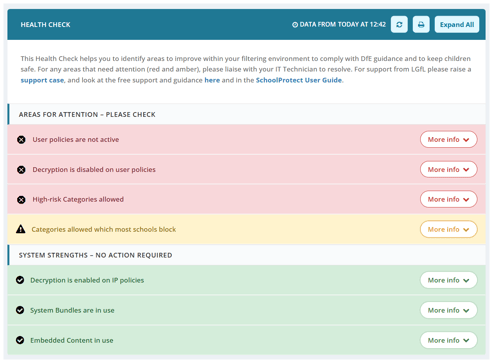
- Decryption and User Authentication have been set up for your school network.
- App Exceptions: As with any filtering provider, certain applications do not interact well with decryption; schools can easily add exceptions to allow these apps to pass through un-decrypted.
- NAT Conflicts: User authentication will not work if a school has a NAT device situated
between their internal network and ours (which typically occurs if a secondary, separate filtering system is installed). - Remote Filtering: Our off-site solution, HomeProtect, automatically sets up decryption and user authentication during installation, requiring no additional technical configuration.
4. Expanded Coverage of Mobile Devices and Apps
The Requirement: Content is increasingly accessed through applications and cloud services rather than traditional browsers. Schools must understand what filtering applies within apps, and where it may not.
The LGfL Response: SchoolProtect is a network-level filter, meaning it applies to any device and any app running while connected to the school’s network (provided HTTPS decryption is active).
For remote and off-site learning, HomeProtect runs directly on the device with platform-specific capabilities:
- Windows: System-wide filtering; every app is filtered exactly like SchoolProtect.
- Chrome OS: All native browser traffic is completely filtered, though standalone Android apps do not pass through the filter.
- Apple iOS / iPadOS: Available in two configurations:
- Browser Method: Web activity within the dedicated HomeProtect browser is filtered; external apps are not.
- Full Device Filter (VPN Method): All applications and system browsers are filtered, though some apps may require decryption exceptions.
To find out more about LGfL's filtering products, please visit
schoolprotect.lgfl.net and homeprotect.lgfl.net
If you are a DSL looking for filtering support, please visit
safefiltering.lgfl.net
Meeting the Updated UKSIC Appropriate Monitoring Definition
Monitoring systems must move away from passive logging and transition toward active, risk-assessed strategies. Here is how LGfL Senso supports schools in meeting these requirements:
1. Clearer Monitoring Strategies Linked to Risk Assessment
The Requirement: Schools should select specific monitoring approaches (physical, logfile-based, or active/pro-active systems) based explicitly on their local safeguarding risks and operational context.
The LGfL Response: To match your school's risk profile, we offer two distinct monitoring services:
- Unmanaged Monitoring: where DSLs must review each capture to decide whether it is a true or false positive, and to decide on necessary actions.
- Managed Monitoring: A comprehensive human moderation service. Trained safeguarding professionals review every single capture, assess its priority level, and directly alert nominated school staff regarding time-critical or high-level concerns. This drastically reduces administrative overhead for high-volume schools, allowing DSLs to focus directly on pupil support.
Request a Managed Monitoring quote for your school.
2. Greater Emphasis on Staff Capability and Response
The Requirement: Monitoring systems must be supported by:
-
Sufficient staff capacity
-
Appropriate safeguarding expertise
-
Processes to review, prioritise and act on alerts
The LGfL Response: LGfL Senso's managed monitoring is an option for schools with high volumes of captures and that require extra staff capacity to triage and manage them.
Alert management - Nominated contacts receive real-time email alerts whenever a capture is triggered. Administrators have full control over alert settings, enabling them to customise alerts by severity level and designate who is notified in different escalations to assist in prioritising action.
LGfL Senso offers half-termly webinars for DSLs, sharing trends found from the service and tips on how best to use the portal. This added value supports schools in moving from reactive safeguarding responses to a more proactive, preemptive position.
Please email us to attend our webinars: monitoring@lgfl.net
3. Improved Expectations for Mobile and App Monitoring
The Requirement: Schools should understand how monitoring applies across:
-
Mobile devices
-
Apps and embedded browsers
-
Remote use of school devices
The LGfL Response: LGfL Senso is a fully cloud-based system. It monitors devices regardless of their physical location as long as an internet connection is active, and safeguarding staff can access this system from any device with an internet connection and an internet browser.
The following Operating Systems are fully supported:
- Windows
- Chrome
- iOS
- MacOSX
LGfL Senso will monitor any device that is installed on, whether on your school network or otherwise.
On iPads, it is important to note that only traffic that passes through the Senso app will be monitored, so we recommend administrators disable other apps on iPads and force all activity through this browser to prevent circumnavigation.
4. Stronger requirements for logging and identification
The Requirement: Monitoring systems should be able to identify users and attribute activity, enabling timely intervention where concerns arise.
The LGfL Response: Each capture logs the corresponding information necessary for schools to determine who triggered it. This includes the device, usernames, keystroke logs, screenshots and time and date stamps. The device and usernames can only be logged if the school has synced with its directory (this will not be the case if you do not have user authentication in place).
Additionally, every change made within the portal is automatically recorded, ensuring a complete and transparent audit trail.
5. Using Analytics to target effective safeguarding response and intervention
The Requirement: Monitoring should not just be about data collection, but about effective safeguarding response and intervention.
The LGfL Response: Our monitoring includes an analytics dashboard that illustrates the key headline figures in real time. It displays key metrics such as volume of alerts, escalation trends, libraries of concern and pupils who may require intervention. Logging analytics can also be used to generate and compare reports over time, supporting school leaders with termly and annual reporting.
DSLs and school leaders can view a detailed breakdown of websites accessed by individual users, providing valuable insights into each pupil’s online behaviour. This feature helps build an accurate understanding of digital usage patterns, aiding targeted support and early intervention.
To find out more about monitoring support from LGfL, please visit
monitoring.lgfl.net