
User authentication is the mechanism that ensures that your filtering system knows the identity of the person logged into a device, rather than simply identifying a device by a generic code (IP Address). Many schools do not have effective user authentication in place, and this article explores why that is an issue for compliance and safeguarding children.
Why is this important for safeguarding?
Firstly, it enables more differentiated, age-appropriate, granular protection. A Key Stage 1 pupil requires an entirely different level of internet restriction compared to a Sixth Former or a member of the school staff. Setting up authentication allows your school to build customised filtering rules based on specific Key Stages, vulnerabilities, educational needs and roles. It prevents the trap of a "one-size-fits-all" policy, which either leaves young children exposed to adult risks or leaves older students over-blocked and unable to complete independent research.
The DfE Filtering and Monitoring Standards (as referenced in KCSIE) state:
Your filtering system should not have a blanket filtering profile for all users. As a minimum, student and staff profiles should be in place to provide differing levels of access to online content.
Secondly, authentication allows you to better safeguard children. If you see a critical concern such as a user searching for weapons or expressing immediate suicidal intent, you need to know who that user is to offer immediate support. Without user authentication, this will be challenging or even impossible to respond effectively. Valuable time is lost tracking down logbooks or cross-referencing timetables to figure out who was sitting there.
How do I find out if our school has enabled User Authentication?
If you are a school that uses LGfL filtering, we have a Health Check on the filtering platform that will show you if user groups have been set up and if they are active. We would strongly encourage DSLs to look at this health check, or alternatively, please ask IT Support colleagues to show this to you.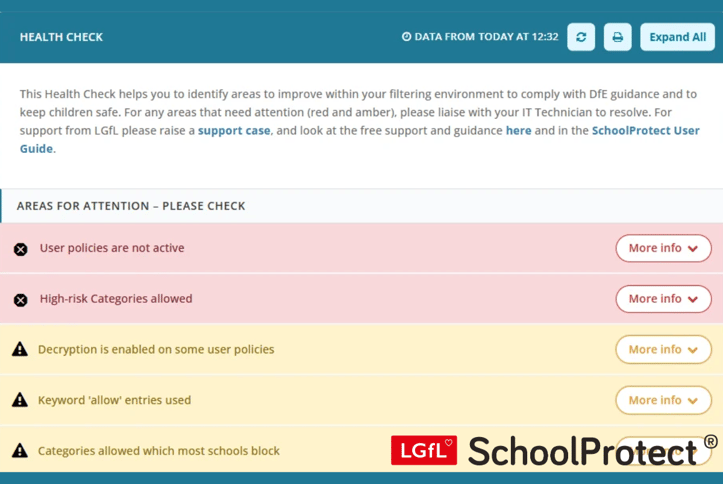
We would recommend that the method your schools uses for user authentication is one of the following:
- Windows – a filtering agent is available whether your devices use local Active Directory, Intune/Entra, or Google sign-in (GCPW)
- Chromebooks – a browser extension, set up through your Google Admin console
- RADIUS – supported if your school network uses it.
If you log in via USO, then this is no longer recommended an effective method of user authentication for filtering on school devices. Please speak to your IT Team about switching to one of the methods above.
For all other schools, please work with your IT leads to ensure user authentication is active, to meet Department for Education (DfE) technical expectations. The DfE Filtering and Monitoring Standards also state that:
It is important to be able to identify individuals who might be trying to access unsuitable or illegal material so they can be supported by appropriate staff, such as the SLT or the designated safeguarding lead.
Your filtering systems should allow you to identify, as a minimum:
- device name or ID, IP address, and, where possible, the individual
- the time and date of attempted access
- the search term or content being blocked
More Support

Come to our Leading Online Safety course for support with understanding and implementing your responsibilities as a DSL for filtering and monitoring in your school.
For more support on anything to do with filtering and your responsibilities as a DSL, please visit safefiltering.lgfl.net. Or if you have any particular queries, please email: safeguarding@lgfl.net